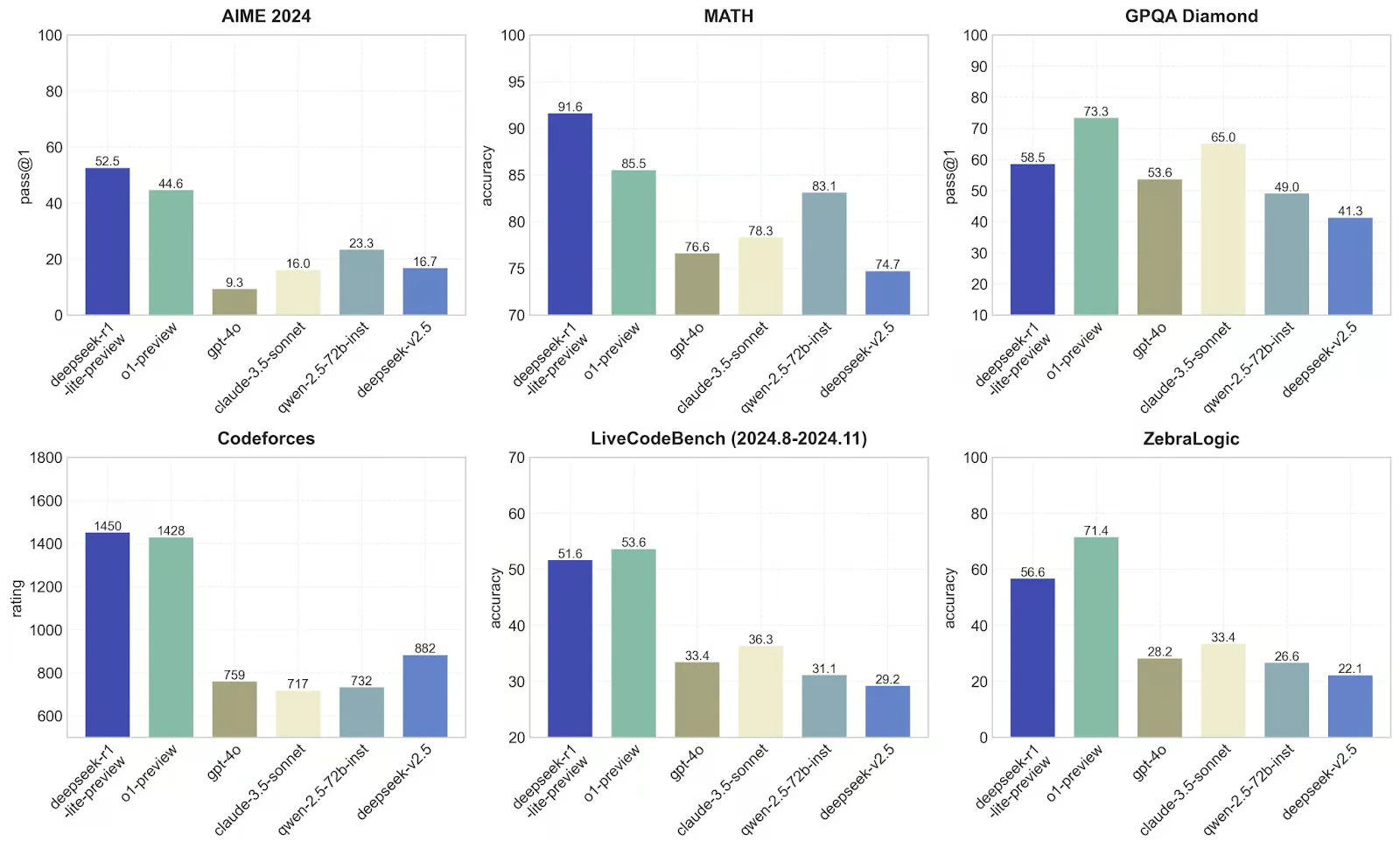

DeepSeek R1 has emerged as a groundbreaking open-source AI model, challenging proprietary solutions with its MIT-licensed availability and state-of-the-art performance. It has outperformed the top models by each provider in almost all the major benchmarks. But this is not the first time a new model has broken records. The most interesting part about this model is this model has Open Sourced its code and training weights with a fraction of costs of any other model. While its Chinese origins initially raised data sovereignty concerns, major cloud providers have rapidly integrated DeepSeek R1, making it globally accessible through compliant channels. In this guide, we will explore:
  • How to access DeepSeek R1 through different providers
  • Real-world performance comparisons with top models from each provider
  • Implementation patterns for various use cases
All of this is made possible through Portkey’s AI Gateway, which provides a unified API for accessing DeepSeek R1 across multiple providers

Accessing DeepSeek R1 Through Multiple Providers

DeepSeek R1 is available across several major cloud providers, and with Portkey’s unified API, the implementation remains consistent regardless of your chosen provider. All you need is the AI Provider slug for your desired provider.

Basic Implementation

Python

Available Providers and Models

Together AI

  • DeepSeek-R1
  • DeepSeek R1 Distill Llama 70B
  • DeepSeek R1 Distill Qwen 1.5B
  • DeepSeek R1 Distill Qwen 14B
  • DeepSeek-V3

Groq

  • DeepSeek R1 Distill Llama 70B

Cerebras

  • DeepSeek R1 Distill Llama 70B

Fireworks

  • DeepSeek R1 671B

Azure OpenAI

  • DeepSeek R1 671B

AWS Bedrock

  • DeepSeek R1 671B

Accessing DeepSeek Models Across Providers

Portkeu provides a unified API for accessing DeepSeek models across multiple providers. All you need to do start using DeepSeek models is to
  1. Get your API Key from one of the providers mentioned above
  2. Get your Portkey API key from Portkey’s Dashboard
  3. Add your provider in Model Catalog. Name it (e.g., together-prod) to get a provider slug. You can set budget limits and rate limits for each provider.
Here’s how you can use Portkey’s unified API
Python
That’s all you need to access DeepSeek models across different providers - the same code works everywhere.

Comparing DeepSeek R1 Against Leading Models

We’ve created a comprehensive cookbook comparing DeepSeek R1 with OpenAI’s o1, o3-mini, and Claude 3.5 Sonnet. This cookbook compares deepseek R1 model from together-ai with top models form OpenAI and Anthropic. We will be comparing the models on three different types of prompts:
  1. Simple Reasoning
  1. Numerical Comparison
  1. Complex Problem Solving
  1. Coding
Here’s the link to the cookbook to follow along as well as results of the comparison.
1

Install

2

Set up Provider Slugs

Python
3

Creating a function to run all the prompts and show the output in a table

Python
4

Running the function

Do this for however many prompts you want to try out.
Python
You can view the result of this comparison in the cookbook and see how DeepSeek R1 compares against the top models from OpenAI and Anthropic.

DeepSeek R1 on top benchmarks

DeepSeek R1 has outperformed the top models from each provider in almost all major benchmarks. It has achieved 91.6% accuracy on MATH, 52.5% accuracy on AIME, and a Codeforces rating of 1450. This makes it one of the most powerful reasoning model available today.

Conclusion

DeepSeek R1 represents a significant milestone in AI development - an open-source model that matches or exceeds the performance of proprietary alternatives. Through Portkey’s unified API, developers can now access this powerful model across multiple providers while maintaining consistent implementation patterns. Explore Portkey further and integrate it into your own projects. Visit the Portkey documentation at https://docs.portkey.ai/ for more information on how to leverage Portkey’s capabilities in your workflow.
Last modified on April 2, 2026